Search without signing in
No account is needed to search. Enter your query and browse matching entries without creating a profile. If an artist search is too broad, try adding a song name to give your next search a clearer focus.

By searching, you agree to our Terms of Use.
Find a song and check its available MP3 audio or MP4 video downloads.
Songs and artists to put on your next listening list.
 Nayvee's PrayerDJ Zinhle, Nayvee Womculo, Young Stunna
 RememberTman Xpress, Mellow & Sleazy
 Myeke (feat. Sne Ntuli)Mshinwemali
 DistanceFEZA, Lwah Ndlunkulu, MaWhoo, FEZA
 Wo Lo (feat. Sino Msolo & Konke)Mihlali The Guy, Dankie Boi, Mr Thela, Cairo CPT
 Gumba Fire (feat. Mr. JazziQ)Focalistic, Optimist Music ZA, Benzoo, Mellow & Sleazy
 Luqale sakudlalaG-Jealous
 Ama hem hem (feat. ShaunMusiq)Thatohatsi, Sjava
 BETHII BETHII (feat. Anathii Deejay & Frostiano)Bello B, Dladla Mshunqisi
 Isesheli (feat. OmaThwala)Mzukulu
Start with a title, performer or video link. These three steps take you through the search form, matching entries and format choices so you can select the recording you intended.
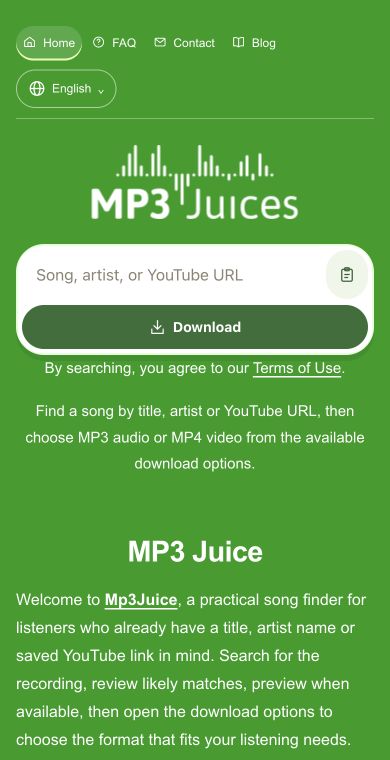
Type your song details into the search field, or paste a YouTube URL if you already have a particular video in mind. Use Download on the form to submit the query. A title and artist together can make the matching entries easier to recognize.
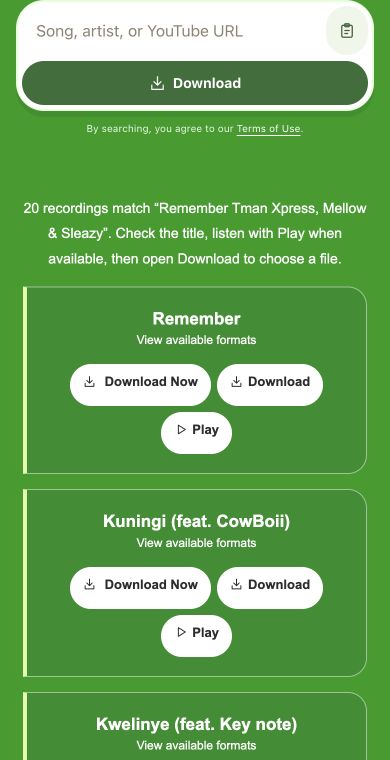
Review the entries before choosing one. Similar titles can refer to different performers, covers or concert recordings, so check the details shown. If Play is available, listen to confirm the version. Then use Download beside that result to view its conversion choices.
Look at the formats offered for your selected recording. Choose MP3 if you want audio, or MP4 if you want video, when available. The source determines the choices, so check what is listed rather than expecting every entry to offer both.
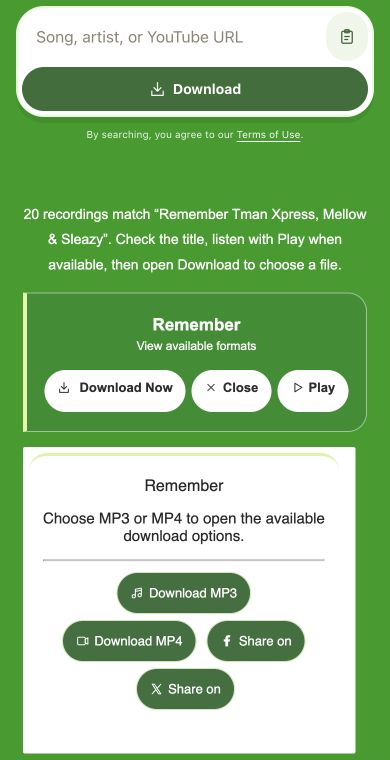
Whether you remember a full title or just the performer, use those details to begin. Review the matches and adjust your query when the recording you want is not obvious.
No account is needed to search. Enter your query and browse matching entries without creating a profile. If an artist search is too broad, try adding a song name to give your next search a clearer focus.
Found a track on a music list elsewhere? Bring its title and performer to the search field. Those details provide a useful starting point, especially when you have not heard the recording or do not remember its full name.
Use Play when an entry offers it to hear whether the recording matches your expectations. This can help distinguish a studio track from a remix or live performance before you move on to the available download options.
A focused query makes results easier to compare. Include details that identify the song, and change the wording if your first search brings up too many unrelated recordings.
Combine the artist with the title when several songs share the same name. Add live or acoustic if that describes the version you need. A few identifying words are more useful than a long description of why you want the track.
Use a YouTube URL when you already know which video you want to check. Submit it through the same search field with Download. A specific link reduces ambiguity about your starting point, but source availability varies and a download may not be offered.
This website's sections offer different starting points: Mp3Juice for song searches, Tubidy for mobile browsing, Fakaza for regional discovery and Ytmp3 for a chosen video. Compare them by the task you have in mind, then check the relevant source.
| Service | Focus | Start with | Keep in mind |
|---|---|---|---|
| Mp3Juice | Song search and downloads | Title, artist or YouTube link | Check the recording and available formats |
| Tubidy | Songs for mobile listening | Title, performer or chart song | Preview a matching recording when available |
| Fakaza | South African songs and artists | Song title and performing artists | Identify the vocalist or collaboration |
| YTMP3 | MP3 audio from a video | A YouTube video link | Open the available audio format |
These are sections on this website. Their names do not guarantee that a particular recording or download format will be available.
Check the recording first, then consider the file type. Conversion quality is limited by source quality, so changing formats cannot recover sound or picture detail missing from the original.
Choose MP3 when offered if you only need the sound. It is the audio option for listening without the accompanying picture. Before selecting it, check that the source is the right performance, since a format choice does not change the recording itself.
Choose MP4 when available if you want the visuals along with the audio. That can matter for a concert performance, music video or demonstration. The selected source determines the video options offered and the detail the converted file can retain.
Yes. Type the song name and select Download on the form. If several entries look similar, search again with the performer or a detail about the version.
Yes. Paste the YouTube URL into the search field and submit it with Download. It points to a specific video, although that source may not be available.
No. The choices depend on the source. MP3 provides audio, while MP4 provides video with sound. Open the result's Download options to see which formats are offered.
No. You can search by title, artist or YouTube URL without signing in. Review the matching entries, then open a result to inspect its available download choices.
Check that you have permission to download and use it. Confirm the title, performer and duration if shown, and try Play when available to verify the version.
Organize Mp3Juice downloads with clear filenames, stable folders, accurate tags, duplicate checks, backups and playlist-safe moves.
Mp3Juice privacy guide: no account does not mean anonymous. Learn safer search, clipboard, incognito, ad, and shared-device habits.
Prepare Mp3Juice music for offline listening by confirming a completed local audio file, compatible player and network-off playback test.
Articles and information pages are in English.
Enter a song, artist or YouTube URL in the search field. Select Download, review the matches and open your chosen result to check available MP3 or MP4 options.